
Upvise7.0.6 - Google Play
You'll be able to see results in few seconds.
Publisher Description
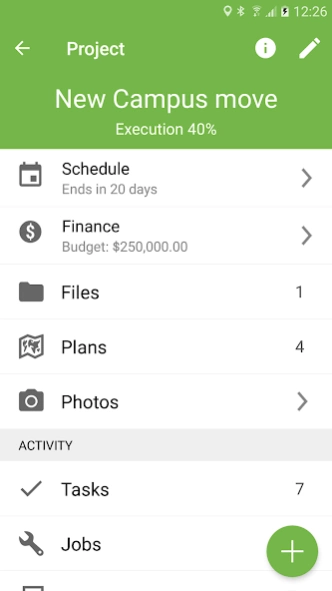


Construction project & Mobile field Platform
UPVISE is a leading construction management platform that connects over 200,000 professionals in more than 20 countries. Upvise provides owners, general contractors, and specialty contractors with the tools they need to get the job done.
Access to critical project information, powerful collaboration tools, and streamlined processes make it easy to stay on schedule and on budget. Companies that use Upvise can experience more work capacity, weekly hours saved, and greater project visibility.
KEY FEATURES
• Ultra-fast native phone & tablet app
• Works offline & auto-sync in the background
• Fully customizable with custom fields, open API & developer tools
• Photo capture & annotation
• Plans & drawings
• Digital signature capture
• Map View & GPS : show assets & jobs near your current location
• NFC tag & QRCode scanning
• PowerBI, Xero, MYOB Integrations
• Google Drive, OneDrive & Dropbox integration
• Share Location with co-workers in real-time (opt-in)
JOB MANAGEMENT
Upvise Job management solution helps you streamline job scheduling, quotes, time, labor, mileage & materials tracking.
Our jobbing tool specializes in simplifying job dispatch and workflows. Replace your current job sheets with state of the art job scheduling using mobile devices.
ASSET MANAGEMENT
+ Equipment, machineries, supplies
+ Location tracking
+ Utilization reporting
+ Preventive maintenance
+ Job repairs
COMMISSIONING & FACILITIES MAINTENANCE
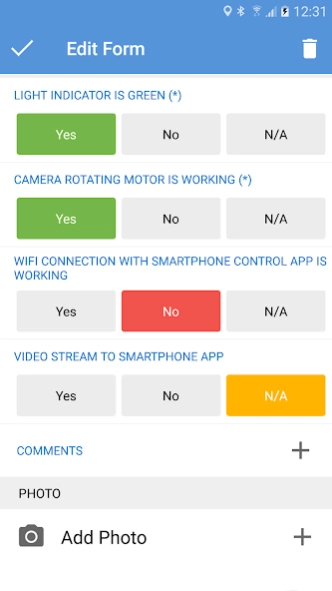
Design checklist forms for your assets and track punch items
Schedule, Assign, Monitor Inspections & Job repairs
QUALITY & SAFETY
Upvise’s quality and safety management solutions help field teams more easily comply with safety regulations and quality specifications. Access to tools on your mobile device like Observations, Incidents, and Inspections help you achieve the highest quality build in the safest environment.
+ Observations
Create observations from the field as you come across them, or create one from a pre-planned inspection.
+ Incidents
Create injury or illness, near miss, environmental and property damage records, and utilize incident data to identify risks and take preventative actions.
+ Inspections
Proactively identify hazards and help stay ahead of safety issues. Manage, baseline, and improve your construction quality performance processes all from your mobile device.
+ HSE Compliance
Toolbox meeting, Permits to work, NCR, Issues,
FIELD MANAGEMENT
Upvise’s field management tools increase productivity for field teams by connecting office and field teams in real-time.
+ Drawings
View drawings and revisions from start to finish, even while offline.
+ Daily Log / Site Diaries
Keep track of every detail including labor, communication, equipment, materials, and job site events each and every day.
+ Punch List
Use your mobile device to create and assign punch list items directly from the field, where most issues are likely to be found.
+ RFIs
Keep RFIs organized and accessible, and quickly turn RFIs into actions.
+ Photos
Capture progress photos of your project from your mobile device and link them to project drawings by location.
WORKFORCE MONITORING
Put the right people on the right jobs and track real-time productivity with Upvise’s workforce management solutions. Easily manage crews, schedules, and tasks to optimize your workforce’s productivity.
+ Timesheets
Have anyone on the team enter project time from the office, the trailer, or the field directly from their mobile device. Site check-in / check-out using QRCode or NFC tag.
+ Daily Reports
PROJECT FINANCIALS
Create beautiful quotes and invoices and send them directly from your mobile phone. Send payment reminders and get paid faster online. Track time for projects, quote and invoice your customers accordingly. Run reports in real-time and gain critical insights on your business performance.
About Upvise
The company that develops Upvise is Unyverse Ltd. The latest version released by its developer is 7.0.6.
To install Upvise on your Android device, just click the green Continue To App button above to start the installation process. The app is listed on our website since 2024-03-29 and was downloaded 0 times. We have already checked if the download link is safe, however for your own protection we recommend that you scan the downloaded app with your antivirus. Your antivirus may detect the Upvise as malware as malware if the download link to Unyverse.pro is broken.
How to install Upvise on your Android device:
- Click on the Continue To App button on our website. This will redirect you to Google Play.
- Once the Upvise is shown in the Google Play listing of your Android device, you can start its download and installation. Tap on the Install button located below the search bar and to the right of the app icon.
- A pop-up window with the permissions required by Upvise will be shown. Click on Accept to continue the process.
- Upvise will be downloaded onto your device, displaying a progress. Once the download completes, the installation will start and you'll get a notification after the installation is finished.
Program Details
System requirements
Download information
Pricing
Version History
version 7.0.6
posted on 2024-03-29
Fixed an issue when taking photos in landscape mode on tablet
Performance improvements
version 7.0.5
posted on 2024-03-19
Support of PDF download and opening from HTML WebView
version 7.0.3
posted on 2024-03-02
Fixed an issue when adding watermark to photos in some cases
Fixed a performance issue when testing if device is offline
version 7.0.2
posted on 2024-02-20
Fixed an issue when adding watermark to photos in some cases
version 7.0
posted on 2024-02-05
Performance improvement in database queries,
version 6.74
posted on 2023-12-08
Long press support on back key to go back home
Bug fixes for data binding
version 6.72
posted on 2023-11-27
Bug fixes for Android 13
version 6.67
posted on 2023-08-19
Targeting API Level 33
version 6.64
posted on 2023-05-24
version 5.5.11
posted on 2015-12-18
Migrated to the new Upvise app,https://play.google.com/store/apps/details?id=unyverse.pro
Disclaimer
Official Google Play Link
We do not host Upvise on our servers. We did not scan it for viruses, adware, spyware or other type of malware. This app is hosted by Google and passed their terms and conditions to be listed there. We recommend caution when installing it.
The Google Play link for Upvise is provided to you by apps112.com without any warranties, representations or guarantees of any kind, so access it at your own risk.
If you have questions regarding this particular app contact the publisher directly. For questions about the functionalities of apps112.com contact us.
